- WordPress Development Agency
WordPress Development Services Built Around Your Business Needs
WordPress development services are the custom coding work behind a WordPress site: building a custom theme, creating a plugin for a feature no existing plugin provides, connecting your site to other systems, and keeping that code fast, secure and easy to maintain. At WP Web Designers, we start by asking whether you need custom code at all, then build only what your site needs.
- Custom code on the WordPress block editor
- Fixed quote after a free consultation
- 30-90 days post-launch support
What You Get With Our WordPress Development Service
Every project starts with a clear scope and ends with a tested build on your live site. Depending on your plan, a project covers:
We define the feature and its connections, then quote a fixed price.
A plugin, a theme change or custom code: we recommend the simplest option that works.
Templates and layouts built on the WordPress block editor, using clean, semantic code.
One purpose-built plugin per feature, so you do not stack extra tools.
Connections to your CRM, payment, booking or other third-party systems.
Everything is built and checked on a private staging site first.
On-page SEO, schema markup, Core Web Vitals work and security hardening.
Launch help, then 30 to 90 days of post-launch support depending on your plan.
Which Type of WordPress Development Is Right for You?
Choose the right WordPress development solution based on your website’s needs, goals, and required functionality.
Option
Best for
What you get
Theme customization
A site that looks right but needs layout changes
Changes to your current theme, tested on a staging copy
Custom theme
A new site, or one that has outgrown its template
A theme built for your pages on the block editor
Custom plugin
A feature no existing plugin provides
One purpose-built plugin for a defined job
Integration
Connecting forms, a CRM, payments or booking tools
A tested connection to the other system
Theme customization
Best for
A site that looks right but needs layout changes
What you get
Changes to your current theme, tested on a staging copy
Custom theme
Best for
A new site, or one that has outgrown its template
What you get
A theme built for your pages on the block editor
Custom plugin
Best for
A feature no existing plugin provides
What you get
One purpose-built plugin for a defined job
Integration
Best for
Connecting forms, a CRM, payments or booking tools
What you get
A tested connection to the other system
Our WordPress Development Process, Step by Step
Here is what each phase involves, what you receive and what we need from you, so you can plan your own time.
Phase
What happens
What you receive
What we need from you
1. Discovery and scoping
We define the feature, its users and the systems it connects to
A clear scope and a fixed quote
A short call, site access and a list of needs
2. Approach
We choose between a plugin, a theme change or custom code
Our recommendation, with reasons
Your decision on the approach
3. Staging setup
We copy your site to a private staging site, so the live site stays untouched
A private staging site to review
Hosting access or a recent backup
4. Development
We build the theme, plugin or integration on staging
A working version to review
Quick answers to questions
5. SEO and speed check
We check markup, headings, page speed and Core Web Vitals
A checked build
Nothing at this stage
6. Testing
We test forms, integrations, user roles, browsers and phones, and harden security
A tested build
Your sign-off on staging
7. Launch
We move the work to your live site and check it again
New functionality on your live site
Confirmation you are ready
8. Support
Post-launch support begins, with monthly maintenance plans after it
30 to 90 days of support, depending on your plan
Tell us about anything unexpected
1. Discovery and scoping
What happens
We define the feature, its users and the systems it connects to
What you receive
A clear scope and a fixed quote
What we need from you
A short call, site access and a list of needs
2. Approach
What happens
We choose between a plugin, a theme change or custom code
What you receive
Our recommendation, with reasons
What we need from you
Your decision on the approach
3. Staging setup
What happens
We copy your site to a private staging site, so the live site stays untouched
What you receive
A private staging site to review
What we need from you
Hosting access or a recent backup
4. Development
What happens
We build the theme, plugin or integration on staging
What you receive
A working version to review
What we need from you
Quick answers to questions
5. SEO and speed check
What happens
We check markup, headings, page speed and Core Web Vitals
What you receive
A checked build
What we need from you
Nothing at this stage
6. Testing
What happens
We test forms, integrations, user roles, browsers and phones, and harden security
What you receive
A tested build
What we need from you
Your sign-off on staging
7. Launch
What happens
We move the work to your live site and check it again
What you receive
New functionality on your live site
What we need from you
Confirmation you are ready
8. Support
What happens
Post-launch support begins, with monthly maintenance plans after it
What you receive
30 to 90 days of support, depending on your plan
What we need from you
Tell us about anything unexpected
The Process at a Glance
Plan:
We scope the work and choose the simplest approach.
Build and test:
We build on staging, check speed and SEO, and test before launch.
Launch and support:
We move the work to your live site and support it after launch.
What Can Delay Your Launch
- Missing access to your hosting or live site
- Features that change after scoping has finished
- Slow feedback or approvals on the staging site
- Paid plugin or service accounts that are not set up on time
- Content that is not ready when the pages are built
WordPress Development Cost and Plans
WordPress development with us starts at $500 and runs up to $1,500, depending on the plan. These are starting-from ranges, not final quotes. After a free consultation, you receive a fixed quote for your project.
- Professional
$500 – $800
Best for: Established sites that need custom features, store functionality or technical SEO work.
- 15-30 pages
- Full brand and UX strategy
- WooCommerce up to 50 products
- Technical SEO architecture
- GA4 and Search Console setup
- 2 Revision rounds
- Enterprise
$1,000 – $1,500
Best for: Custom builds, integrations, and multilingual or multisite projects.
- Unlimited pages
- Custom theme architecture
- API and third-party integrations
- Multilingual and multisite support
- Dedicated project manager
- Ongoing retainer available
- Small Custom Tasks
$100 – $500
Best for: Businesses that need a specific WordPress fix, feature, or improvement without a full website rebuild.
- WordPress bug fixes and troubleshooting
- Theme customization and layout adjustments
- Small custom plugin development
- Third-party integration fixes
- Performance and technical SEO improvements
- Scope-based pricing after a free consultation
- Not included in the price: domain registration, hosting, premium plugin licences, stock photography and copywriting. We can advise on all of these.
What moves a development project from one plan to the next
The number of custom features
What a Development Project Costs in Its First Year
The plan price covers our work. Other costs go to other providers, so budget for them early.
Cost
What it covers
When you pay
Development work
Scoping, building, testing and launching your custom features
Us, as a fixed quote
Domain name
Your website address
Your domain registrar
Hosting
The server your site runs on
Your hosting provider
Premium plugins and services
Paid tools or accounts that some features depend on
The plugin or service provider
Maintenance after support
Updates, backups and monitoring once your support period ends
Us, on a monthly plan
Content and media
Copywriting and photography
You, or a writer you choose
Development work
What it covers
Scoping, building, testing and launching your custom features
Who you pay
Us, as a fixed quote
Domain name
What it covers
Your website address
Who you pay
Your domain registrar
Hosting
What it covers
The server your site runs on
Who you pay
Your hosting provider
Premium plugins and services
What it covers
Paid tools or accounts that some features depend on
Who you pay
The plugin or service provider
Maintenance after support
What it covers
Updates, backups and monitoring once your support period ends
Who you pay
Us, on a monthly plan
Content and media
What it covers
Copywriting and photography
Who you pay
You, or a writer you choose
Need a feature built the right way?
Why We Build With Clean Custom Code and Only the Plugins You Need
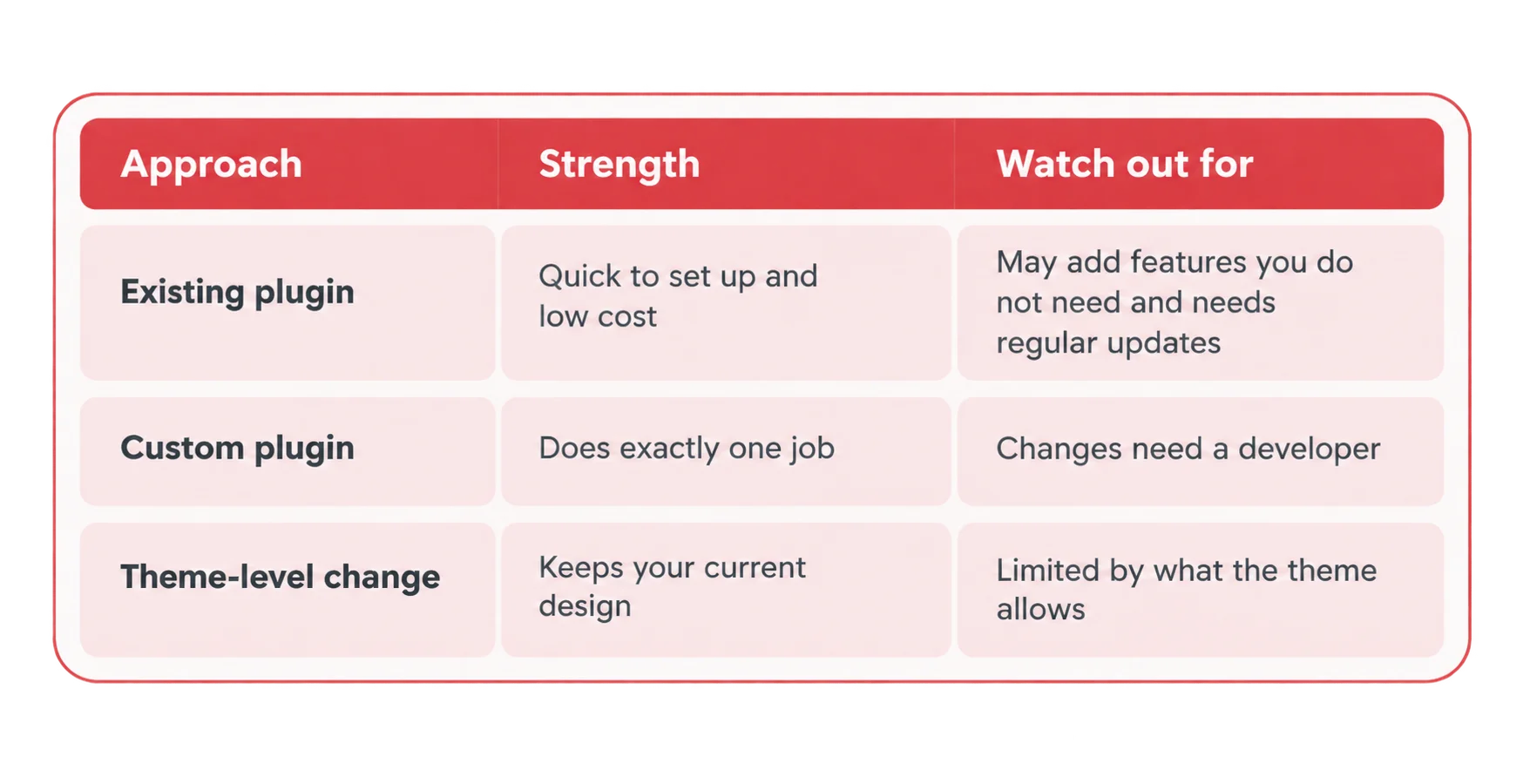
Every extra plugin is code you have to keep updated, and overlapping or heavy plugins are a common reason WordPress sites run slowly. We start by asking whether the problem needs new code at all. If a reliable plugin does the job, we recommend and configure it. If not, we write only the code your feature needs, as a custom plugin or part of a custom theme on the block editor.
Speed, SEO and Security Built Into Every Build
We load only the code each page needs and review page speed on staging before launch.
Semantic HTML and a clear heading order help search engines and screen readers.
On-page SEO and schema markup are part of the build, not added afterwards.
Layout, images and scripts are built with Core Web Vitals in mind.
Forms and custom features handle user input safely, and the site is hardened before launch.
Code follows WordPress conventions, so core and plugin updates are less likely to break it.
What We Test Before Every Launch
- Forms and integrations send data correctly
- Custom features work for each user role
- Pages display correctly on common browsers and phone sizes
- New code does not conflict with your existing plugins or theme
- Broken links and 404 errors are found and fixed
- Security hardening is applied
- Page speed is reviewed on the staging site
- The build works with the current version of WordPress
Who Owns Your Code and What You Receive at Handover
You retain ownership of your custom code, with clear documentation, access credentials, and everything you need to manage your WordPress website confidently.
How to Choose a WordPress Developer: 7 Questions to Ask Any Agency
Use these questions with any agency, including us.
Can I see work like mine? Ask for real examples and read them yourself. Ours are on our portfolio page.
Who will write the code? Ask for the name and role of the builder. Our team is shown below.
Plugin or custom code? A good developer uses a reliable plugin when it does the job and writes custom code only when it does not.
How do you test before launch? Ask about a staging site, form tests and a speed review.
Who handles updates after launch? Our support period covers the first 30 to 90 days, then monthly maintenance plans take over.
What is not included in the price? Ask in writing: domain, hosting, premium plugins and copywriting.
Who owns the code? Ask before you sign, and get the answer in writing.
Who We Build For and Where We Work
Our team works remotely with clients in the US, UK, Canada, UAE and Australia. You can browse the industries we serve or see how we work in each market.
Meet the Team Who Will Build Your Site


Digital Marketing

Client Relationship & SEO Expert

UI UX & WordPress Web Designer


Plus 9 more in-house specialists
Copywriters, ecommerce specialists, WordPress maintenance engineers, and client success managers all on staff, never outsourced.
- Contact Us
Tell Us What Your Site Needs to Do
Share your project. We will review it, ask the right questions and send you a clear scope.


Related Services for Your New Website
Designing the site first:
If you are starting from scratch, see our WordPress website design service.
Selling online:
If your project involves a store, see our WooCommerce website design service.
Keeping it running:
After your support period, see our WordPress maintenance and support.
WordPress Development FAQs
What are WordPress development services?
WordPress development services cover the custom coding behind a WordPress site: custom themes, plugins, integrations with other systems, and the speed, security and testing work that keeps that code reliable. Design decides how a site looks. Development builds the features that make it work.
How much do WordPress development services cost?
What is the difference between WordPress design and WordPress development?
Design covers structure, layout and branding. Development covers the code that makes features work, such as custom plugins, integrations, user roles and speed. Many projects need both, so we plan them under one scope and one quote.
Do I need a custom plugin, or will an existing plugin do?
How long does a custom WordPress development project take?
The timeline depends on scope, so we give you one after scoping and before building starts. A standard website build typically takes 2-3 weeks and a WooCommerce store 6-8 weeks. Timelines start once access, content and approvals are in place.